You're probably staring at a run sheet that already feels overbuilt.
The venue needs final numbers. Your speaker wants confidence monitors. Marketing wants live chat, polls, and replay clips. IT wants to review the platform. The executive sponsor assumes the virtual audience can “watch the stream.” Meanwhile, you know that if the online experience feels like an afterthought, people will drop off fast.
That's the real work behind hybrid events management in 2026. It isn't two separate projects taped together. It's one event with two audience realities. One group feels the room, reads body language, and networks in the hallway. The other arrives through a screen, judges every pause, and needs active reasons to stay involved.
What is hybrid events management?
Hybrid events management is the practice of planning, producing, and measuring a single event that runs in a physical room and on a live stream at the same time, so both audiences share one story instead of two disconnected experiences. It combines traditional event planning (venue, staging, catering, run of show) with broadcast production (cameras, switching, streaming, moderation) and a platform layer (registration, engagement, analytics) under one plan and one budget.
The difference from plain event management is the second audience. A virtual attendee can leave in one click, so pacing, camera language, and interaction have to be designed on purpose. The fix is never adding more moving parts. The fix is designing one coherent experience from the start: shared goals, different delivery methods, tighter production discipline, and a speaker strategy built for both the room and the camera.
Why hybrid is your new default
Most planners don't struggle with hybrid because they lack effort. They struggle because hybrid exposes every weak assumption in the plan. If the agenda runs long, the remote audience feels it first. If the room energy is great but the stream mix is poor, half the event fails anyway. If networking only happens onsite, virtual attendees know they bought access to a broadcast, not an event.
That's why treating hybrid as a temporary add-on no longer works. The hybrid model has become the new industry standard, with 70% of all global events adopting this format. This shift is driven by performance, as hybrid events demonstrate 50% better attendance rates and 71% higher registration numbers compared to purely in-person events, according to hybrid event statistics summarized here.
Those numbers line up with what planners have seen on the ground. Hybrid widens access. It gives executives a way to include field teams, customers, and partners who won't travel. It also gives attendees a choice, which matters more than many event teams admit.
What changes when you accept hybrid as standard
Once you stop asking whether hybrid is “worth it,” better decisions follow.
- You build one event story: The onsite agenda and virtual agenda serve the same objective instead of competing for attention.
- You plan for parity, not sameness: The in-room audience doesn't need the same mechanics as the virtual audience. They need equal value.
- You produce for the camera on purpose: Lighting, framing, pacing, and transitions stop being technical details and become part of experience design.
Practical rule: If your virtual audience can only watch, you are streaming an event. You are not hosting a hybrid one.
The strongest hybrid events don't feel split. They feel connected. That's the standard worth aiming for.
Building your hybrid event blueprint
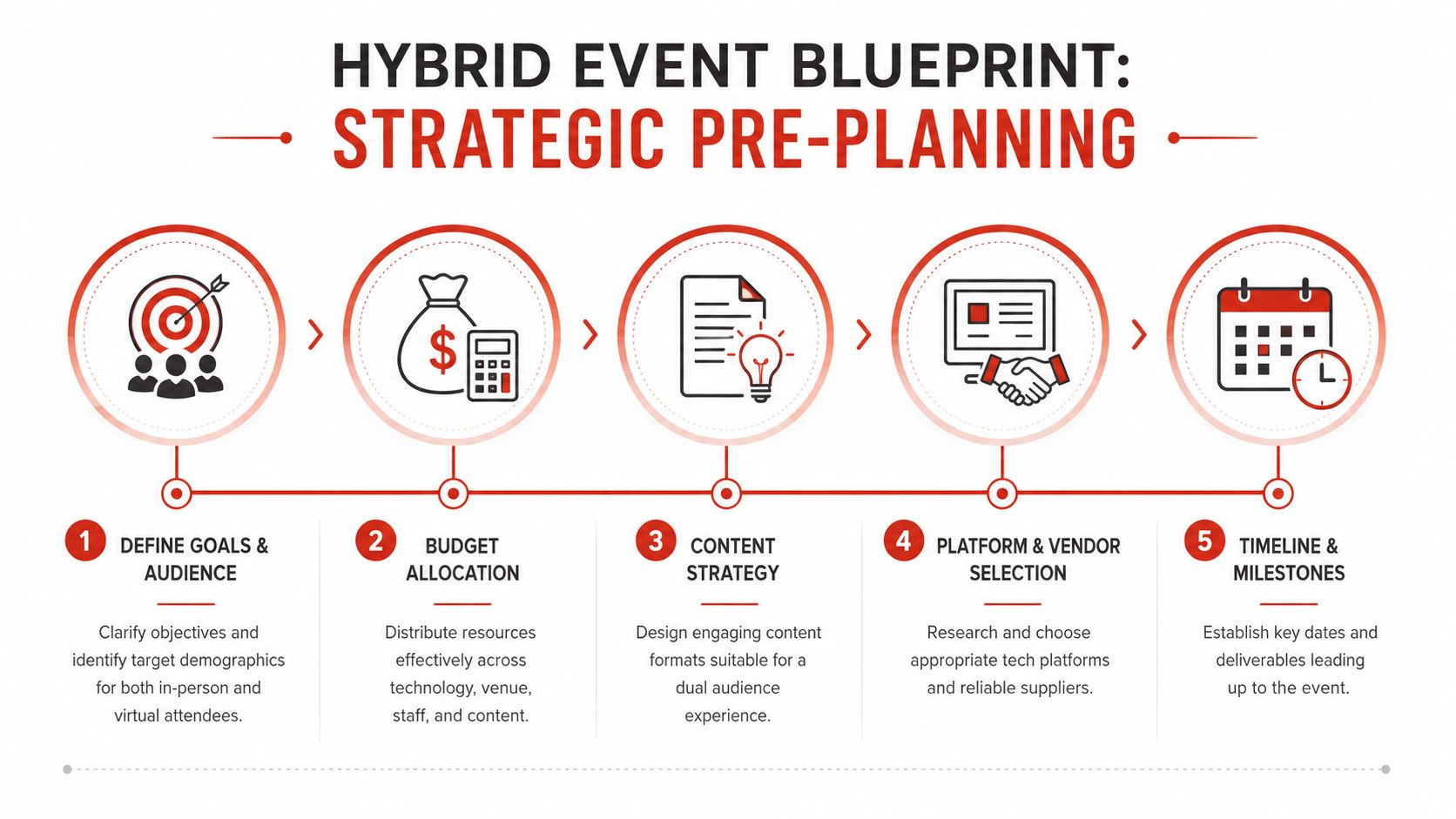
Good hybrid events are won long before show day. The quality of the experience usually reflects decisions made early, when the team is still defining outcomes, assigning ownership, and deciding what “success” means.
Start with one business objective
A hybrid format should solve a real event problem. Sometimes that problem is reach. Sometimes it's inclusion for distributed teams. Sometimes it's giving customers and prospects a lower-friction way to attend. Whatever the reason, define it in one sentence before you choose a platform or venue.
A few useful versions:
- Leadership all-hands: Align remote and onsite employees around a shared message.
- Sales kickoff: Create one launch moment while giving field teams access without travel.
- Customer event: Expand attendance while protecting the energy of the live room.
- Training or workshop: Blend live facilitation with structured virtual participation.
Once the objective is clear, define both audiences. What matters most is what each one needs to do by the end of the event. The biggest planning mistake is assuming the virtual audience is just the overflow audience. They often have different expectations, attention patterns, and constraints.
Build a timeline that respects production reality
Many teams underestimate the planning window because they focus on venue logistics and forget the broadcast layer. Large-scale hybrid events management requires a longer planning runway of 6–12 months to coordinate both physical logistics and technical streaming infrastructure, as noted in Guidebook's hybrid event planning overview.
That longer runway matters because several workstreams need to move together:
| Planning area | What needs to happen early |
|---|---|
| Content | Session formats, run times, speaker coaching, audience interaction design |
| Production | Camera plan, graphics package, streaming workflow, show calling |
| Platform | Registration flow, attendee journey, moderation tools, support model |
| Staffing | Virtual host, moderators, AV lead, stage manager, help desk coverage |
| Communications | Attendee instructions, speaker briefings, sponsor deliverables |
Guidebook also notes that assigning dedicated virtual hosts to manage remote engagement separately from the main presenters is a critical success factor. That role shouldn't be an afterthought. The virtual host handles chat tone, cues remote participation, surfaces questions, and keeps online attendees oriented during transitions.
The moment you assign one person to own the virtual audience, the online experience usually gets sharper.
Budget as one event, not two silos
A weak budget creates hybrid problems that look operational later. Teams often fund the venue, staging, food, and travel properly, then treat streaming, moderation, graphics, captioning, and remote support as optional extras. That's how you end up with a polished ballroom and a mediocre broadcast.
Use one integrated budget with four buckets:
- Experience costs for venue, stage, catering, signage, and attendee flow.
- Broadcast costs for cameras, switching, audio mix, encoding, recording, and stream operations.
- Platform costs for registration, audience engagement, analytics, and support.
- Human costs for producers, moderators, hosts, operators, and rehearsal time.
That unified view forces better trade-offs. If budget is tight, cut complexity before you cut audience support. A simpler stage with a stronger virtual host usually performs better than an overdesigned room with no one managing the online experience.
Hybrid vs virtual vs in-person events
It helps to name what changes when you move between formats, because the management effort is not evenly distributed. Hybrid carries the coordination load of both other formats at once.
| Format | Primary audience | Where the risk lives | Management focus |
|---|---|---|---|
| In-person | One room | Logistics, venue, attendee flow | Experience design and run of show |
| Virtual | One screen | Attention, drop-off, platform stability | Pacing, interaction, stream health |
| Hybrid | Room and screen together | Parity between two audiences and the handoff between them | One story, two delivery methods, redundant production |
The takeaway is simple. Hybrid isn't harder because the technology is exotic. It's harder because you own two attention curves at the same time and have to keep them from diverging.
What travel managers need to know about hybrid events
For organizations where travel managers oversee the meeting-and-events budget, hybrid adds a layer that a pure venue contract doesn't capture. The travel and meeting side (flights, hotels, ground transport, per diems) is only half the spend. The broadcast side (streaming infrastructure, remote platform licenses, moderation staff, technical production) needs its own line in the budget and its own vendor relationships.
Where travel managers often get tripped up:
- Assuming the AV vendor covers streaming: Many venue AV contracts include a screen and a microphone. Broadcast-quality streaming for a remote audience is a separate scope, often requiring a dedicated production company or a platform like Cvent, InEvent, or Hopin that integrates travel logistics with streaming tools.
- Underestimating the registration split: Hybrid registration requires two attendee tracks: onsite (with hotel blocks, flight coordination, and ground transport) and virtual (with platform access, time-zone scheduling, and on-demand replay). Each track needs its own communication sequence.
- Missing the cost offset: Hybrid events typically save roughly 40% on venue and travel costs versus a same-size all-in-person event, because a meaningful share of attendees attend virtually. The savings on hotel rooms and flights can absorb the streaming production premium when the budget is structured correctly.
The smartest hybrid travel managers treat the virtual attendee as a distinct traveler type: same content access, different logistics path. When that mental model is in place, the planning workflow becomes much cleaner.
Running a safe hybrid event: risk and contingency planning
A safe hybrid event doesn't happen by accident. The in-person side has well-established venue safety protocols. The broadcast side needs its own risk layer, and that's where most teams underinvest.
Technical failures affect 40% of hybrid events: at least one audio or video disruption per event, according to Lyyti's hybrid event management research. That's not a reason to avoid hybrid. It's a reason to plan for it explicitly.
The minimum redundancy plan for a safe hybrid production:
- Dual internet paths: Primary venue connection plus a tested 4G/5G backup that the broadcast lead can switch to in under 60 seconds.
- Spare audio chain: Backup wireless microphone packs, spare batteries, and a handheld that can reach any speaker on stage.
- Local recording capture: Record to a local drive independent of the stream. If the live broadcast fails, the recorded content can be distributed within hours.
- Named substitution contacts: Every critical role (show caller, broadcast lead, virtual host) needs a backup person who is briefed and available, not just theoretically reachable.
- Speaker briefing on failure protocols: Speakers should know what to do if their slides freeze, the stream drops, or Q&A needs to pause. That briefing takes five minutes and prevents visible panic on camera.
On the in-person safety side, hybrid events with large audiences need standard venue risk planning: emergency egress, on-site medical support, and communication protocols if the physical event needs to pause or stop. Remote attendees in that scenario need a clear message from the virtual host, not silence and a frozen screen.
A safe hybrid event is one where the failure modes have been named, assigned, and rehearsed. Not one where everyone agrees it “probably won't fail.”
Choosing your tech stack and AV team
Most hybrid event failures don't come from a bad concept. They come from a mismatch between the event ambition and the technical plan. Teams buy a platform, assume the venue AV vendor can “handle streaming too,” and discover too late that a room mix is not the same as a broadcast mix.
Platform choice is a control decision
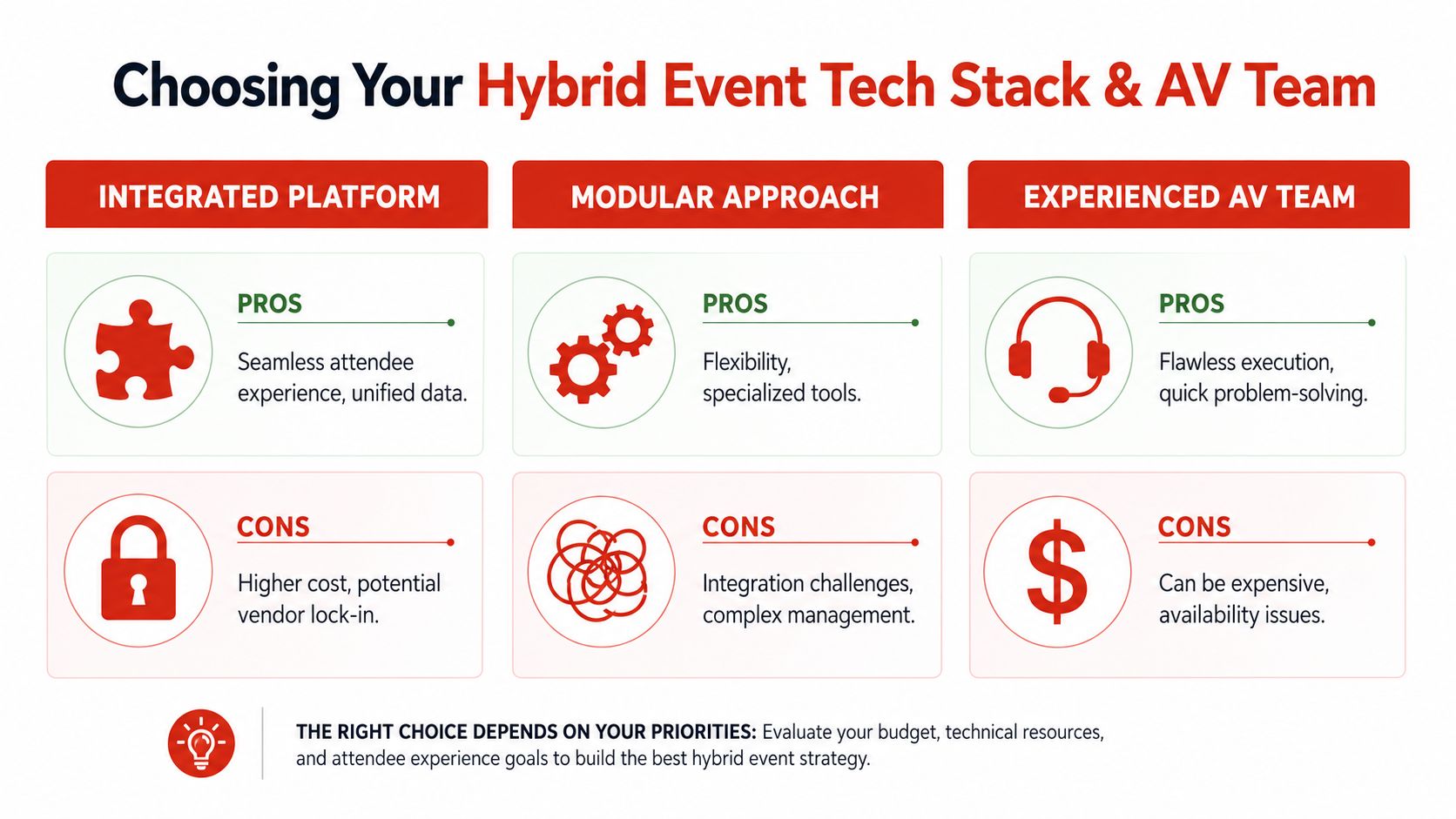
There isn't one perfect setup. The right stack depends on how much control your team wants and how much complexity it can absorb.
| Option | Best when | Watch out for |
|---|---|---|
| Integrated platform | You want one attendee journey and cleaner reporting | Less flexibility, harder to swap components |
| Modular stack | You need specialized tools for registration, streaming, networking, or analytics | More integration work and more vendor coordination |
An integrated setup tends to work well for internal meetings, leadership broadcasts, and events with straightforward audience flows. A modular setup makes sense when the event has distinct content tracks, sponsor requirements, or advanced production needs. For B2B hybrid events specifically, look for platforms that handle 1:1 meeting scheduling between attendees, virtual sponsor booths, and lead capture for exhibitors. Those features separate a B2B-grade platform from a basic streaming tool.
Some teams also commission custom hybrid event management software when reporting or integration demands outgrow off-the-shelf tools, though that path adds build time and maintenance.
Your AV team and your streaming team are not the same thing
A great in-room AV company may be excellent at screens, stage sound, and confidence monitors. That does not automatically mean they're built for live switching, stream health monitoring, remote audience support, and broadcast cueing.
A resilient hybrid crew usually includes distinct responsibilities:
- Show caller or producer: Owns timing, cues, transitions, and issue escalation.
- Broadcast lead: Manages switching, stream output, recording, and signal confidence.
- Audio engineer: Mixes for the stream, not only for the room.
- Virtual host or moderator: Guides chat, Q&A, and remote expectations.
- Technical support team: Helps attendees with access, audio, browser, and login issues.
A short visual example helps here:
Designing the dual audience experience
The difference between a passable hybrid event and a memorable one usually appears in the first ten minutes. If the in-room audience gets a full welcome, ambient energy, and clear cues while the virtual audience sees a holding slide and silence, the split is obvious immediately.
Strong hybrid events management closes that divide. It does not force both groups into identical experiences. It creates shared moments while respecting the reality that one audience is in a chair at a venue and the other is deciding, every few minutes, whether to keep watching.
Design for parity, not duplication
Guidebook notes that virtual sessions should be capped at 45–60 minutes with built-in breaks in hybrid planning best practice, and that matters because online attention behaves differently than room attention. A keynote that feels electric onsite can feel long on a laptop if the camera language, pacing, and interaction design don't change.
The fix is structural. Shorter blocks. More varied formats. Cleaner visual storytelling. Tighter transitions.
Here's where teams often get it wrong:
- They stream the room exactly as is: Wide shots, tiny slides, slow resets, and dead air between segments.
- They overload the virtual attendee with passive viewing: Long sessions and no reason to interact.
- They separate participation channels too aggressively: The online audience asks questions in one lane, the room in another, and neither feels connected.
What works better is a run of show built around shared touchpoints. Polls that both audiences answer. Q&A that blends room mics with chat questions. Speaker prompts that acknowledge both audiences naturally. Projecting virtual comments or faces into the room also helps make the online audience visible instead of abstract.
A hybrid audience feels unified when both groups can influence the live moment.
Build the agenda like a show, not a conference grid
A traditional conference schedule often assumes attendees will tolerate longer sessions, room resets, and uneven pacing. Virtual viewers won't. They need rhythm.
A useful pattern looks like this:
| Agenda block | In-room experience | Virtual experience |
|---|---|---|
| Opening | Walk-in music, emcee, stage energy | Countdown, virtual host welcome, chat warm-up |
| Keynote | Main stage presentation | Broadcast-first framing, live chat prompts, moderated Q&A |
| Break | Coffee and networking | Prompted discussion, sponsor content, optional networking room |
| Panel | Live audience questions | Blended Q&A and poll responses surfaced on screen |
| Workshop | Table discussion | Facilitated breakout with clear instructions and timed rejoin |
Networking needs a host, not just a feature
Many hybrid platforms offer networking tools. That doesn't mean networking will happen. Left alone, virtual attendees rarely create the same spontaneous hallway energy that exists onsite.
A better approach is hosted interaction. Give remote attendees guided prompts, timed meetups, topic rooms, or moderated small-group discussions. If there's an in-person coffee break, create a virtual equivalent with a purpose. “Discuss what stood out in the keynote” works better than “Open networking.”
The virtual emcee changes everything
The best hybrid events usually have someone who acts as the on-air host for the online audience. Not a generic moderator. A real guide.
That person welcomes viewers, resets context after breaks, explains what's happening off camera, keeps energy up during delays, and makes remote attendees feel seen. They can also coordinate with the stage manager so the online audience never sits in confusion when the room is busy with a reset or overrun.
A ballroom host speaks to the room. A virtual emcee speaks to the viewer. In hybrid, you need both.
Engaging speakers for a hybrid stage
A speaker who can own a room may still struggle on a hybrid stage. The problem usually isn't expertise. It's delivery. Hybrid asks a speaker to split attention between people in front of them and people they can't fully see, while staying natural on camera.
That's why briefing matters. A keynote in a ballroom and a keynote in a hybrid setting are different jobs.
Give speakers a broadcast brief, not just a schedule
Most speaker briefs cover timing, audience profile, and AV basics. For hybrid, that's not enough. Speakers need to know where the cameras are, when to address them directly, how Q&A will be handled, and what visual materials will look like on screen.
A practical brief should cover:
- Camera awareness: Which camera is live during opening, storytelling moments, and audience interaction.
- Slide design: Fewer words, stronger contrast, readable charts, and visual pacing that survives a small screen.
- Q&A flow: Whether chat questions will be fed to a moderator, confidence monitor, or stage host.
- Movement: Where they can stand without leaving the best camera frame.
- Pacing: Where to pause, where to tighten, and how to let a remote audience catch up.
The strongest innovators and founders often adapt well once they understand the medium. A visionary speaker talking about AI, invention, or future-of-work change can be riveting in hybrid, but only if the session is built for both immediacy and clarity. If you're evaluating what kind of presenter fits that brief, this guide on how to hire a keynote speaker is useful for thinking beyond reputation and focusing on fit, format, and audience outcome.
Why the right speaker changes hybrid attendance rates
Speaker selection is one of the few hybrid levers that lifts both the in-room and the virtual audience at the same time. A speaker with genuine credibility and a clear story gives remote attendees a reason to stay on screen rather than multitask. It gives onsite attendees a reason to talk about the event afterward. That word-of-mouth is what drives registration for the next year.
In practice, speakers who perform well in hybrid settings share a few traits. They speak to a single idea rather than a broad survey of a topic, because a focused message survives the attention compression of a screen better than a wide-ranging presentation. They build interaction in: a question, a poll prompt, a direct acknowledgment of the online audience. And they rehearse with the technology, not just around it.
At Silicon Valley Speakers, the speakers we work with (builders, inventors, and founders who have shipped real things) tend to adapt well to hybrid precisely because their material is specific. Specificity is what makes a story work in a ballroom and on a laptop screen equally well. If you're building the speaker portion of a hybrid program, start with an inquiry and describe the format. Hybrid speaker selection is different from filling a general keynote slot, and the brief matters.
Workshops need extra choreography
Interactive sessions are where hybrid speaker quality really shows. A standard lecture can survive weak adaptation. A workshop cannot.
For breakout-based formats, speakers and facilitators should know:
- How mixed participation will work: Separate virtual breakout rooms often work better than trying to force one blended discussion format.
- How instructions will be delivered: Spoken once is never enough. Put steps on screen and repeat them clearly.
- How rejoin moments will be handled: Bring both audiences back with a crisp recap and one shared question.
The best hybrid speakers don't try to pretend both audiences are identical. They acknowledge the difference and still make both groups feel included.
Leadership speakers, performance experts, and innovation facilitators usually land best when they build interaction in layers. Start broad with a poll or reflection. Narrow into small-group work. Rejoin with selected takeaways from both online and in-room participants. That pattern gives everyone a visible role in the session.
Rehearsal is where confidence comes from
A speaker rehearsal for hybrid shouldn't be symbolic. Run the actual sequence. Test the walk-on, the opening line, the slide handoff, the monitor placement, the Q&A rhythm, and the close.
What doesn't work is telling a speaker, “It'll feel natural on the day.” Hybrid rarely does unless someone has built the conditions for it.
Measuring success and your post-event playbook
If your post-event report still splits the experience into “onsite metrics” and “virtual metrics” without showing how they worked together, you miss the true value of hybrid. The point is not proving that two channels existed. The point is proving that one event delivered business value across two modes of participation.
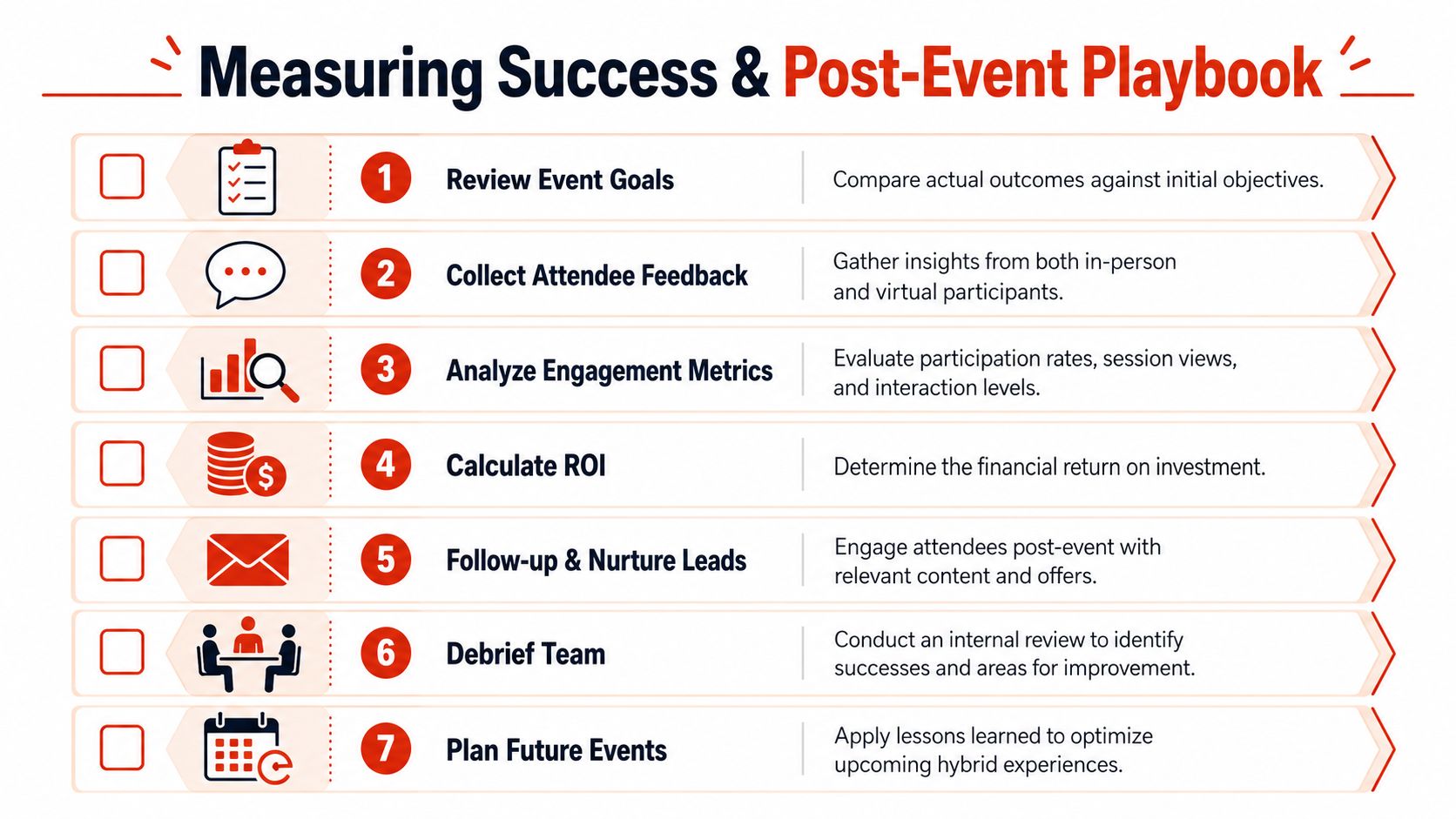
Guidebook's best practices call for tracking distinct attendance and participation rates for both audiences, comparing registration to actual attendance, and monitoring active engagement indicators like Q&A submissions, poll responses, and chat activity in a unified way. That approach is far more useful than vanity reporting because it shows where attention held and where the design broke down.
Build one dashboard
A strong dashboard should answer a few plain questions:
- Did the event attract the right people?
- Did they show up?
- Did both audiences participate, not just attend?
- Which sessions held attention and which lost it?
- What content should be reused next?
The cleanest post-event reviews combine attendance behavior, engagement behavior, and qualitative feedback from both audiences. If stakeholders struggle to read the report, simplify the presentation.
Run the debrief while details are fresh
Hold a team debrief quickly. Not weeks later when everyone has rewritten the day in their head.
Use three buckets:
| Debrief area | Key question |
|---|---|
| Experience | Did both audiences feel included and informed? |
| Production | Where did timing, tech, or handoffs create risk? |
| Content | Which formats translated well across both audiences? |
Then turn that into a master run-of-show checklist for the next event:
- Confirm ownership: Every audience touchpoint needs a named owner.
- Lock the interaction plan: Polls, Q&A, and networking should never be improvised.
- Test the failure points: Audio, connectivity, playback, and speaker transitions need rehearsal.
- Capture reusable content: Tag moments for replay, recap clips, internal comms, and sales follow-up.
- Review with honesty: If virtual attendees were mostly passive, fix the design instead of blaming attention spans.
A hybrid event ends on site. Its value doesn't. The recordings, clips, follow-up emails, speaker highlights, and internal recap assets often carry the message far longer than the live day itself.
Hybrid events management FAQ
What is hybrid events management?
Hybrid events management is the practice of planning, producing, and measuring one event that runs in a physical room and on a live stream at the same time. It merges traditional event planning, broadcast production, and a platform layer under a single plan and budget, so the in-room and virtual audiences share one connected experience instead of two separate ones.
How is hybrid event management different from virtual or in-person event management?
In-person management centers on the room and logistics. Virtual management centers on the screen and attention. Hybrid carries both at once, which means you own two attention curves and have to keep them from diverging. The extra work is parity between the two audiences and the handoff moments between them, not exotic technology.
What does a hybrid event management team need?
A resilient hybrid crew usually separates in-room AV from broadcast. At minimum that means a show caller or producer, a broadcast lead for switching and stream health, an audio engineer mixing for the stream, a virtual host or moderator for the online audience, and a technical support team for attendee access issues.
How long does it take to plan a hybrid event?
Large-scale hybrid events typically need a 6 to 12 month runway to coordinate physical logistics and streaming infrastructure together. Smaller internal broadcasts can move faster, but the broadcast layer, rehearsal, and redundancy planning still need real lead time that venue-only timelines tend to ignore.
What platforms work best for B2B hybrid events in 2026?
For B2B hybrid events, the platforms that stand out are the ones that combine registration, streaming, 1:1 meeting scheduling, and lead capture in one system. Cvent, InEvent, and Hopin each do this at different price points and audience sizes. Under 200 attendees, most teams can use a modular approach: a streaming tool plus a registration platform. Above 1,000, an integrated system saves significant coordination overhead. The B2B-specific features to look for: virtual sponsor booths, attendee networking directories, CRM integration, and engagement analytics that go beyond view counts.
Do I need custom hybrid event management software?
Most teams do not. An integrated platform works well for internal meetings and leadership broadcasts, and a modular stack fits events with distinct tracks or sponsor requirements. Custom software only makes sense when reporting or integration demands outgrow off-the-shelf tools, and it adds build time and ongoing maintenance.
Can I get a custom quote for a hybrid event with livestream and on-site management?
Yes. Because hybrid pricing depends on audience size, production scope, redundancy, and speaker needs, a real quote starts from your objective and run of show rather than a fixed package. Silicon Valley Speakers can help scope the speaker and stage side of a hybrid production and point you to the right production partners for livestream and on-site management.
If you're planning a hybrid event and want a keynote speaker who can connect with both the room and the remote audience, Silicon Valley Speakers can help. Their curated roster includes builders, inventors, and leaders with real-world credibility, from AI pioneer Adam Cheyer to founders, performance experts, and innovation voices who know how to deliver memorable presentations for modern corporate events.